





Getting more Google reviews is not complicated in principle. Ask real customers for honest feedback, make the process easy with a direct link or QR code, send the request at a sensible point in the customer journey, and apply the same process consistently.
The difficulty is doing that without drifting into review gating, incentives, employee quotas, or other practices that can manipulate the rating customers see.
Google's current Maps user-generated content policy is more specific than many older review guides suggest. Businesses should not selectively solicit positive reviews, offer rewards in exchange for reviews, pressure customers to review while on the premises, or tell reviewers what specific content to include.
For a local business, the better approach is a repeatable review-request system built around genuine customer experiences. That supports reputation management while fitting naturally into a broader local SEO strategy.
How to Get More Google Reviews: The Short Answer
A reliable Google review process has five parts:
- Define who is eligible. Ask customers who have completed a genuine interaction or transaction with your business.
- Use an objective trigger. Send the request after a completed job, purchase, delivery, appointment, or other clear milestone.
- Make reviewing easy. Provide Google's direct review link or QR code.
- Ask neutrally. Request honest feedback rather than a positive or five-star rating.
- Measure the process. Track how consistently requests are sent and whether the system is working without rewarding staff for positive reviews.
The most important distinction is between experience and sentiment.
It is reasonable to wait until a customer has actually experienced the product or service. It is not reasonable to decide who receives a public review invitation based on whether that customer appears happy.
BrightLocal's 2026 Local Consumer Review Survey found that 97% of surveyed consumers read reviews for local businesses and that asking for feedback substantially increased the likelihood of receiving it. The survey was conducted with U.S. consumers, so the numbers should be treated as directional evidence rather than Canadian population statistics. BrightLocal's full 2026 survey provides the methodology and wider findings.
The practical lesson is straightforward: businesses do not need elaborate tactics to create more review opportunities. They need a consistent process.
What Google Allows and What It Prohibits
Google permits businesses to remind customers to leave reviews and provides tools specifically for that purpose. The problems begin when the business tries to influence who reviews, what they say, or what rating they give.
A useful policy framework is to separate review tactics into three groups.
Practice
Status
Why
Ask a genuine customer for an honest review
Generally allowed
The request follows a real customer experience
Send the same neutral request after every qualifying transaction
Generally allowed
Eligibility is based on an objective event, not sentiment
Share Google's direct review link
Generally allowed
Google provides this feature
Display a Google review QR code
Generally allowed
Google specifically supports QR codes for review requests
Send one reasonable follow-up reminder
Use judgment
Keep it neutral and avoid repeated pressure
Ask only customers who say they are satisfied
High risk / prohibited practice
This can become selective solicitation of positive reviews
Ask for a five-star review
Avoid
The request attempts to influence the rating
Ask the reviewer to mention an employee, keyword, or service
Prohibited under Google's current policy
Google says merchants should not request specific review content
Give a discount, gift card, free product, or contest entry for a review
Prohibited
Google treats incentives for reviews as fake engagement
Require staff to collect a certain number of reviews
Prohibited
Google specifically identifies staff review quotas as rating manipulation
Ask employees, family members, or others with conflicts of interest to review
Prohibited / removable
The review may not be independent
Pressure customers to complete a review while still on site
Prohibited
Google says merchants should not require or pressure users to review on the premises
Buy reviews or arrange review exchanges
Prohibited
These do not represent independent, genuine customer experiences
Google's policy explicitly addresses fake engagement, incentives, conflicts of interest, selective positive-review solicitation, employee review quotas, on-premises pressure, and predetermined review content.
The Review Gating Problem
Review gating happens when a business separates customers according to expected sentiment before giving them an opportunity to post a public review.
A common version looks like this:
- Ask every customer, "How was your experience?"
- Send customers who choose 9 or 10 out of 10 to Google.
- Send customers with lower scores to a private feedback form.
- Only the positive group receives a public review link.
That workflow may look sophisticated, but its purpose is to selectively direct positive sentiment toward the public review platform.
A safer process is:
Completed customer experience → neutral review invitation → customer independently decides whether and what to post
Private feedback surveys can still be useful. They should not function as a screening mechanism that determines who is allowed or encouraged to review the business publicly.
A Simple Review Request Decision Test
Before deploying any review tactic, ask four questions:
- Did this person have a genuine experience with the business?
- Would we make the same request if we did not know whether the customer was happy?
- Are we avoiding incentives, pressure, ratings language, and prescribed review content?
- Does the communication channel itself comply with applicable rules and customer consent requirements?
If the answer is yes to all four, the request is on much firmer ground.
If the answer to the second question is no, there is a good chance the workflow is filtering by sentiment.
How to Get Your Google Review Link and QR Code
You do not usually need a third-party Google review link generator.
Google provides a native link and QR code through your Business Profile. According to Google's current review link and QR code instructions, businesses can use these tools in receipts, thank-you emails, chat interactions, and printed materials.
To get the link:
- Sign in to the Google account that manages the Business Profile.
- Open the Business Profile.
- Select Read reviews.
- Select Get more reviews.
- Copy the review link.
- Save the QR code if you also want a printed version.
Google currently notes that QR codes are generated through a computer browser rather than the mobile workflow.
Test the Link Before You Use It
This step matters more for businesses with multiple locations.
Open the link in a private or incognito browser and confirm that it points to the correct Business Profile. Do the same with the QR code from at least one iPhone and one Android device if the code will appear in printed materials.
For a company managing multiple Toronto or Canadian locations, keep a simple location sheet containing:
- Business location name
- Google Business Profile URL
- Direct review link
- QR code file
- Person responsible for that location
- Date the link was last tested
A review system becomes difficult to manage when different employees create their own shortened URLs, QR codes, or third-party review pages without central oversight.
Build a Review Request Workflow That Runs Every Time
The strongest review system is not the one with the most aggressive request language. It is the one that operates consistently after qualifying customer experiences.
A practical workflow looks like this:
1. Define the Eligible Customer Event
Choose an objective point at which the customer has enough experience to give meaningful feedback.
Examples include:
- A home-service job marked complete
- An appointment completed
- A restaurant transaction completed
- An ecommerce order delivered
- A product received and given a reasonable use window
- A professional-services milestone completed
- A support interaction closed
Avoid rules such as:
- Customer gave us a high satisfaction score
- Customer complimented the technician
- Customer did not complain
- Employee believes the customer is happy
Those rules make sentiment part of eligibility.
2. Choose a Consistent Trigger
The trigger can be manual or automated.
For example, a plumbing company might send the request two hours after a work order is marked complete. An ecommerce business might wait several days after delivery so the customer has time to use the product.
The exact timing is less important than having a defensible reason for it.
3. Send a Neutral Request
Keep the message short. The customer should understand who is asking, why, and where to leave feedback.
Do not try to coach the rating.
4. Make the Next Step Easy
Send the customer directly to Google's review interface rather than a page with several unnecessary clicks.
A QR code can work well on receipts, appointment cards, checkout materials, or invoices. Google explicitly permits businesses to share its review link and QR code.
5. Set a Reminder Rule
A single reminder may be reasonable when the first request goes unanswered. Avoid repeatedly contacting the same customer until a review appears.
The reminder should be just as neutral as the original request.
6. Stop the Workflow
A review process needs an end point.
Do not create a permanent sequence that keeps requesting a review every few days. Repeated pressure is poor customer experience even before policy concerns are considered.
7. Measure the Process
Track whether eligible customers are actually receiving the request. This is more useful operationally than setting a target number of five-star reviews.
Mini Example: A Toronto Home-Service Business
Consider an anonymized workflow for a Toronto home-service company. This is an illustrative process example, not a claimed client result.
The company previously left review requests to individual technicians. Some technicians asked frequently, some never asked, and others only asked customers who had complimented their work.
A cleaner process would remove that discretion. When a completed job reaches a defined status in the CRM, every eligible customer receives the same neutral email with the correct location's Google review link. A service complaint can still enter the company's resolution workflow, but the customer's access to the review request is not removed simply because the feedback may be negative.
The improvement is not a clever script. It is consistent governance.
Businesses building wider organic acquisition systems should apply the same discipline to their website. Review growth works best alongside strong location and service pages, which is where on-page SEO becomes part of the broader local-search picture.
When Should You Ask for a Google Review?
Ask after the customer has had a genuine experience and while that experience is still recent enough to remember clearly.
There is no universal number of hours or days that every business should follow.
Home-Service Businesses
A good trigger is usually job completion.
For longer projects, the request may make more sense after a meaningful completed milestone or after the entire engagement is finished.
Restaurants and Retail
A customer may be able to review immediately after the transaction because the experience has already occurred.
A passive QR code on a receipt, table card, or takeaway material can make the option available without requiring staff to stand over the customer while the review is written.
Ecommerce Businesses
The purchase itself may be too early.
Consider sending the request after confirmed delivery plus enough time for the customer to inspect or use the product.
Professional Services
The right timing depends on the engagement.
A lawyer, accountant, consultant, agency, or other professional-services business may have a clearly completed matter, project phase, deliverable, or engagement. Use a consistent milestone that makes sense for the service.
Avoid Turning a Good Moment Into a Sentiment Filter
There is nothing wrong with making customer experience better before asking for feedback.
The problem is using positive sentiment as the requirement for receiving the public review link.
For example:
Better: "Your installation is complete. We welcome honest feedback about your experience."
Avoid: "You said you were happy with the installation. Would you leave us a five-star review?"
The first version is based on the completed service. The second explicitly uses satisfaction to solicit a positive rating.
Google Review Request Templates for Email, SMS, In Person, and QR Codes
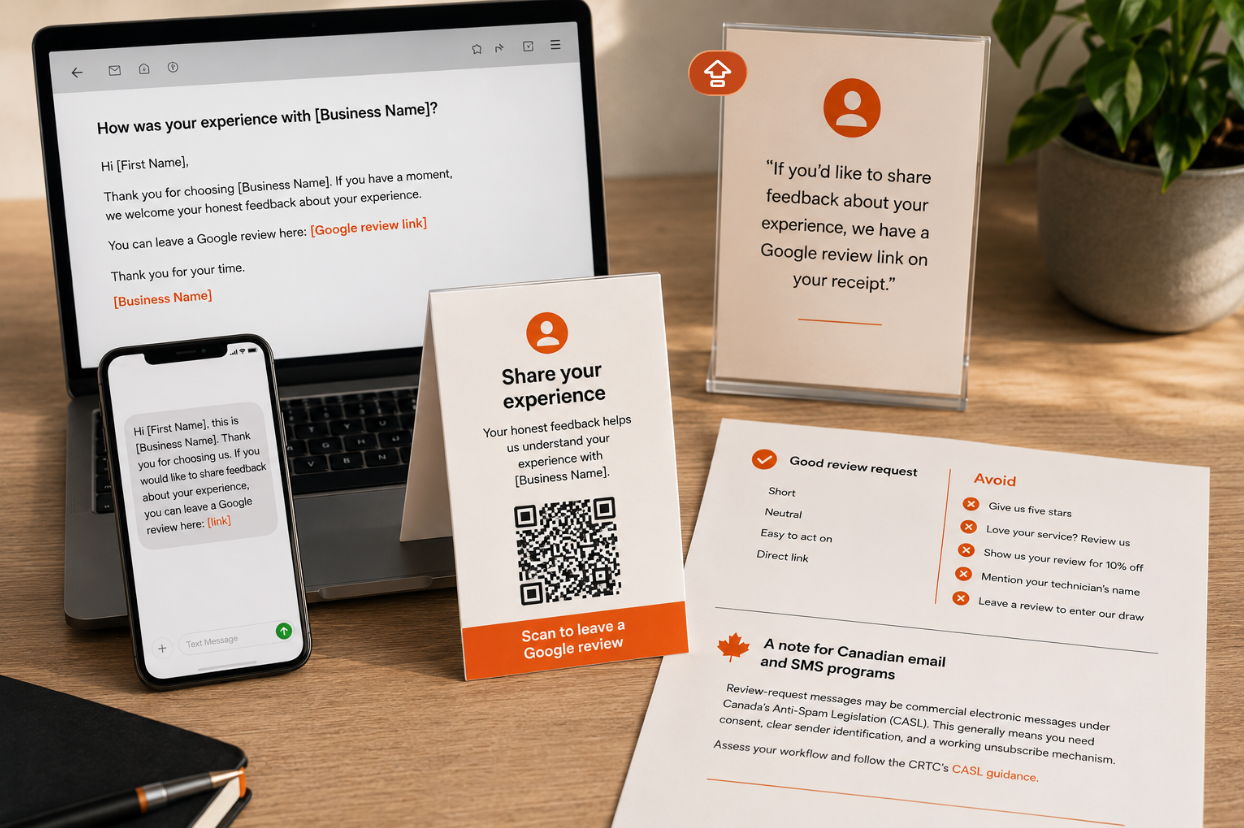
Good review-request templates are short, neutral, and easy to act on.
Businesses often weaken otherwise sound review programs by adding too much promotional language. The customer does not need a sales pitch after the transaction. They need a clear request and a direct link.
Email Review Request Template
Subject: How was your experience with [Business Name]?
Hi [First Name],
Thank you for choosing [Business Name]. If you have a moment, we welcome your honest feedback about your experience.
You can leave a Google review here: [Google review link]
Thank you for your time.
[Business Name]
Shorter Email Version
Subject: Share your feedback
Hi [First Name],
We would appreciate your feedback on your recent experience with [Business Name].
Leave a Google review: [Google review link]
Thank you,
[Business Name]
SMS Review Request Template
Hi [First Name], this is [Business Name]. Thank you for choosing us. If you would like to share feedback about your experience, you can leave a Google review here: [link]
Keep SMS requests short. Avoid adding promotional offers, referral requests, or several unrelated calls to action to the same message.
In-Person Review Request
A staff member can use simple language:
"If you'd like to share feedback about your experience, we have a Google review link on your receipt."
That makes the option available without asking for a particular rating or pressuring the customer to complete the review while the employee watches.
Google says merchants should not require or pressure users to leave ratings or reviews while on the premises. Its policy also says merchants should not request specific content in the review.
QR Code or Printed Material
Keep the text around a QR code minimal:
Share your experience
Your honest feedback helps us understand your experience with [Business Name].
Scan to leave a Google review
Avoid:
- "Give us five stars"
- "Love your service? Review us"
- "Show us your review for 10% off"
- "Mention your technician's name"
- "Leave a review to enter our draw"
A Note for Canadian Email and SMS Programs
Canadian businesses should also consider whether their review-request communications fall within Canada's Anti-Spam Legislation.
The CRTC says that when a message is a commercial electronic message, the core CASL requirements generally include consent, sender identification and a working unsubscribe mechanism. Whether a particular review request qualifies as a commercial electronic message depends on the message's purpose and circumstances, so businesses should assess their own workflow rather than assuming every review email or SMS is automatically exempt.
The CRTC's CASL guidance provides the official requirements and links to applicable regulations.
For teams sending review requests at scale, templates should be governed in the same way as other customer communications. A documented content marketing process can help maintain consistent messaging, ownership, and review standards across channels.
How to Automate Google Review Requests Without Review Gating
Automation is useful when it removes inconsistent manual work. It becomes risky when the software decides who receives a public-review opportunity based on predicted sentiment.
A safe automation model starts with an operational event.
For example:
Job completed → customer qualifies → review request sent
Not:
Satisfaction survey → positive response → Google review request sent
The second workflow filters customers according to sentiment.
Audit Your Automation Logic
Before turning on an automated review campaign, check:
- Is the request triggered by a completed transaction or genuine customer experience?
- Does customer sentiment affect whether the Google review link is shown?
- Are customers with lower satisfaction scores sent somewhere different?
- Does every eligible customer have an equal opportunity to leave public feedback?
- Does the template ask for an honest review rather than a positive rating?
- Are any discounts, rewards, contests, or gifts attached to the review?
- Is the correct review link connected to each business location?
- Is the system asking reviewers to include employee names, service names, locations, or other specific content?
- Is there a reasonable stopping point for reminders?
- Can an administrator review and change the logic centrally?
Watch Third-Party Reputation Platforms Carefully
A reputation-management platform does not automatically make a review program compliant.
Some workflows have historically been built around collecting an initial private rating and then routing customers differently depending on the result. Businesses should understand what their software actually does rather than relying on labels such as "reputation management" or "review automation."
Ask the vendor to show the complete customer journey for both a positive and negative respondent.
If the public Google review option disappears for the negative respondent, the system deserves closer review.
Avoid Sudden Review Bursts
Google's policy identifies unusual review volumes or patterns that indicate attempts to manipulate a business's rating as potentially problematic.
That does not mean legitimate growth must occur at a perfectly fixed rate. Customer volumes change, seasonal businesses get busy, and campaigns can increase the number of genuine requests.
It does mean a business should be cautious about suddenly sending a review request to years of old customer records in one batch. A steady process tied to current customer activity is easier to operate and easier to explain.
What to Measure Without Creating Bad Incentives
Review measurement should help the business understand whether the request process is functioning.
It should not pressure employees to produce positive ratings.
Useful metrics include:
- Eligible customer transactions
- Review requests sent
- Request coverage rate
- Email or SMS delivery rate
- Review-link clicks, where available
- New reviews received
- Review completion rate
- Review volume by location
- Average rating as an outcome metric
- Unusual spikes in review activity
- Reviews removed for policy reasons
- Review workflow errors
Prioritize Request Coverage
One of the most useful operational metrics is:
Request coverage rate = review requests sent ÷ eligible customer experiences
For example, if 500 qualifying jobs were completed and 450 customers received the approved review request, request coverage is 90%.
That tells management something actionable. The process failed to reach 50 eligible customers.
By contrast, a goal such as "every employee must collect 10 Google reviews this month" can create exactly the wrong incentives. Google's current policy specifically identifies merchants requesting staff to solicit a certain number of reviews as rating manipulation.
Separate Process Metrics From Outcomes
Management can still monitor:
- Total reviews
- Average rating
- Reviews by location
- Review trends over time
But these should not become employee-level quotas for positive feedback.
A company cannot control what rating an independent customer gives. It can control whether the customer had a genuine opportunity to provide feedback.
Common Mistakes That Put Reviews or Your Profile at Risk

Most risky review strategies come from trying to control the outcome rather than improve the process.
Asking Only Happy Customers
"Ask your happiest customers" remains common advice, but it is difficult to reconcile with Google's current prohibition on selectively soliciting positive reviews.
Set eligibility based on the completed customer experience instead.
Offering a Discount, Gift, or Contest Entry
Google treats incentives offered in exchange for reviews as fake engagement.
This includes free goods, discounted services, payment, and other benefits offered for posting a review. Google's review-request guidance states that reviews should reflect genuine experiences and that incentivized reviews are prohibited.
Asking for Five Stars
Ask for an honest review, not a predetermined score.
The customer's rating should be their decision.
Asking Customers What to Write
Do not tell reviewers to include a staff member's name, target keyword, city, product, or service.
Google explicitly says merchants should not request that specific content be included in solicited reviews.
Giving Employees Review Quotas
A quota can encourage selective asking, customer pressure, or other manipulation.
Measure whether employees or systems follow the approved request process instead.
Asking Connected People to Review
Employees, former employees, family members, competitors, contractors, and others with a material connection can create conflict-of-interest issues.
Canada's Competition Bureau similarly states that online reviews and testimonials should reflect authentic experiences and opinions of impartial consumers. Its current enforcement guidance reinforces the importance of authentic reviews.
Pressuring Customers on the Premises
Providing a QR code is not the same as standing beside the customer while they write a review.
Google allows businesses to print and display QR codes, but its content policy says merchants should not require or pressure customers to review while they are on the premises.
Assuming More Reviews Can Replace the Rest of Local SEO
Reviews matter, but they are one part of a larger local-search system.
Google says its local results are mainly based on relevance, distance, and prominence. It also states that more reviews and positive ratings can help local ranking, but there is no legitimate way to request or pay for a better local position. Google's local ranking guidance explains these factors directly.
Businesses still need accurate Business Profiles, strong service and location content, relevant links and citations, and a technically sound website.
The same principle applies as search interfaces change. Google's current guidance says its normal SEO fundamentals remain relevant to AI Overviews and AI Mode, with no separate set of special requirements. Businesses thinking about visibility across newer search experiences can treat reviews as one component within broader AI readiness, not as a shortcut to AI visibility.
Ignoring the Consequences of Manipulation
Google can remove policy-violating reviews.
For fake-engagement violations, Google also says it may temporarily block a Business Profile from receiving new reviews, unpublish existing reviews or ratings, or display a warning informing consumers that fake reviews were removed. Google's Business Profile restriction policy describes these possible actions.
The goal is not to operate as close to the line as possible. A review program should be simple enough that the business can explain exactly why each customer received the request.
Google Review FAQs
Can Businesses Ask Customers for Google Reviews?
Yes. Google explicitly provides businesses with a review-request link and QR code and suggests using them in places such as receipts and thank-you emails.
The request should be for genuine, honest feedback and should comply with Google's review policies.
Can I Offer a Discount for a Google Review?
No. Google prohibits offering incentives such as payments, discounts, free goods, or free services in exchange for posting a review, revising a review, or removing a negative review.
Keep discounts and loyalty offers separate from the review process.
Can I Ask Only Satisfied Customers for Google Reviews?
You should not selectively solicit positive reviews.
Google's current Maps policy specifically says merchants must not discourage negative reviews or selectively solicit positive reviews. A safer process gives every qualifying customer in a defined group the same neutral opportunity to review.
What Is Review Gating?
Review gating is a process that filters customers according to sentiment before directing selected customers toward a public review platform.
A typical example asks for a private satisfaction score first, sends positive respondents to Google, and keeps negative respondents in a private feedback channel. The safer approach is to separate internal feedback collection from the customer's opportunity to leave an independent public review.
Can Employees or Family Members Review My Business?
Reviews affected by conflicts of interest can violate Google's policy.
Google lists professional and personal affiliations, including employment and family relationships, as examples of possible conflicts of interest.
Can I Ask a Reviewer to Mention an Employee or Service?
Do not instruct customers to include particular content.
Google's policy specifically says merchants should not request that specific content be included and gives staff-identifying content as an example. Customers can naturally mention an employee or service if they choose to do so independently.
Are Google Review QR Codes Allowed?
Yes. Google provides a native QR-code feature for requesting reviews and suggests printing and displaying the code in a store.
The QR code itself is not the problem. The surrounding process must still avoid incentives, pressure, and selective positive solicitation.
How Do I Create a Direct Google Review Link?
Open the Business Profile, select Read reviews, choose Get more reviews, and copy the provided link.
Test the link before publishing it. Multi-location businesses should verify that each customer is being directed to the correct location.
Can Google Review Requests Be Automated?
Yes, provided the automation follows the same rules as a manual request.
Trigger the request from an objective customer event such as a completed job or delivered order. Do not use customer sentiment to decide who receives the public review link.
How Many Google Reviews Should I Aim for Each Month?
There is no universal monthly number that guarantees better rankings or business performance.
Review opportunity depends on customer volume, industry, location, and the number of genuine experiences your business creates. A better operational target is to consistently send a neutral request to a high percentage of eligible customers rather than chase an arbitrary review quota.
Do More Google Reviews Help Local SEO?
Reviews can contribute to local visibility, but they are not the only factor.
Google says local results are mainly based on relevance, distance, and prominence. It also states that review count and positive ratings can help local ranking.
That makes reviews worth managing, but not manipulating.
A sustainable review program is ultimately a process problem. Define who qualifies, ask consistently, make the review easy to complete, keep the wording neutral, and audit your automation so positive sentiment never becomes the price of admission.
If your business needs review acquisition to work as part of a broader Google Business Profile and local-search strategy, explore SEO Team Toronto's local SEO services.