.webp)
This on-page SEO guide breaks down how to optimize service pages and blog content in 2025, with a focus on intent clarity, clean structure, and measurable improvements. If your pages are well written but underperforming, the problem is often not “SEO tricks.” It is usually mismatched intent, unclear page signals, or a thin supporting structure.
At SEO Team Toronto, we treat on-page SEO as a system: the right page for the query, the right information in the right order, and the right signals for both readers and search engines.
At a glance: the priorities that move the needle
- Match each URL to a single primary intent (and fix cannibalization early).
- Build service pages to rank and convert, not just to “describe a service.”
- Write blog posts to satisfy the query quickly and then guide next steps.
- Use titles, headings, and internal links to make meaning easy to parse.
- Optimize for modern SERPs (AI summaries, featured snippets, PAA) with clear answer blocks.
- Measure in cycles and iterate, instead of rewriting endlessly.
On-page SEO in 2025: what changed (and what didn’t)
Search results are more crowded than they were a few years ago. Many queries now trigger AI-generated summaries, featured snippets, People Also Ask boxes, and richer layouts that compete for attention. Pew Research has documented that users are less likely to click when an AI summary appears, and they rarely click sources within the summary itself, which changes how you should think about visibility and value. (Pew Research Center)
What has not changed is the core job of on-page SEO: make the page the best answer for a specific intent, and make that obvious. Google continues to emphasize helpful, reliable, people-first content. (Google Search Central)
A practical set of “SERP realities” for 2025
- You are competing for clicks and for citations inside AI summaries and answer features.
- Pages that are easy to extract from (clear headings, tight definitions, direct answers) tend to surface more often.
- Trust signals matter more when the page is being summarized or quoted out of context.
- Helpful structure beats clever wording. Readers scan, then decide what to read.
- On-page improvements perform best when the technical foundation is stable.
If you build pages that satisfy the query quickly, support the claim with clear detail, and guide the next step, you remain competitive even when clicks are harder to earn.
Start here: map intent and prevent cannibalization
Before you touch titles or headings, decide what each page is meant to do. The most common on-page failure we see is a site that has multiple URLs trying to rank for the same intent, or one URL trying to rank for several intents at once.
The Service Page vs Blog Post Decision Tree (Framework)
Use this simple decision tree when assigning a query to a page type:
- Is the searcher trying to hire, compare providers, or request a quote?
- Yes: build or improve a service page.
- No: go to the next question.
- Yes: build or improve a service page.
- Is the searcher trying to learn, understand, or solve a problem themselves?
- Yes: write a blog post (or guide) that answers it directly.
- No: go to the next question.
- Yes: write a blog post (or guide) that answers it directly.
- Does the query include strong local intent (Toronto, near me, GTA) and the searcher wants a provider?
- Yes: build a local-optimized service page and align it with local signals.
- No: go to the next question.
- Yes: build a local-optimized service page and align it with local signals.
- Is the intent mixed or unclear?
- Choose one primary intent for the URL, then support the other intent with a separate page and strong internal linking.
- Choose one primary intent for the URL, then support the other intent with a separate page and strong internal linking.
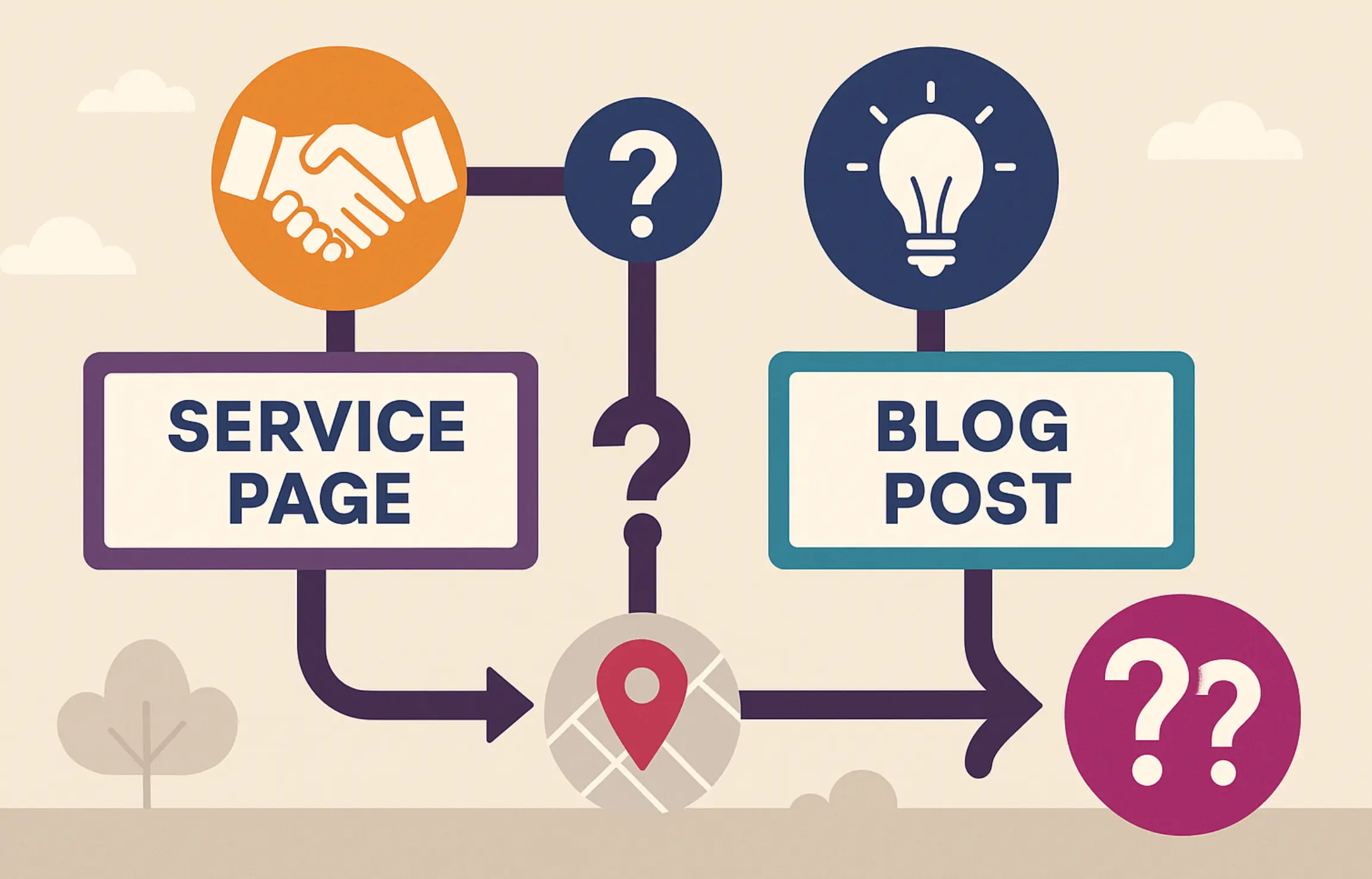
This decision tree prevents “hybrid pages” that do not satisfy anyone fully.
A quick intent mapping process you can run in under an hour
- List your target queries (start with your top converting services and top traffic blogs).
- Assign each query to one primary URL.
- For each URL, write a one-sentence intent statement: “This page exists to…”
- Identify overlaps where two URLs serve the same intent.
- Choose the primary URL and make everything else support it.
Cannibalization symptom checklist
If you see two pages fighting each other, you usually see one or more of these patterns:
- Rankings bounce between two URLs for the same query.
- Search Console shows impressions for the same query spread across multiple URLs.
- The “wrong” page ranks (a blog post ranks for a service query, or the service page ranks for a how-to query).
- Both pages sit around positions 8 to 20 and do not break through.
- Internal links point inconsistently, or anchors send mixed signals.
Fixing cannibalization without burning everything down
- Consolidate: merge overlapping pages and redirect the weaker URL when content is truly duplicative.
- Differentiate: refocus one page on a different intent (for example, “cost guide” vs “service provider”).
- Rewire internal links: point the cluster toward the primary URL with clear anchors.
- Adjust titles and headings: remove accidental “service intent” phrasing from blog posts that should be informational.
Mini example (anonymized)
A Toronto-area home services company had a “Service in Toronto” page and two blog posts with titles that included the same “Service Toronto” phrase. The blogs attracted early traffic, but they also competed with the service page for the commercial query.
The fix was simple and measured:
- The service page was rebuilt to clearly match hire intent (scope, proof, pricing approach, CTA).
- The blog posts were refocused on informational intent (cost, timelines, permits) and updated to link to the service page with descriptive anchors.
- Within weeks, the service page became the consistent ranking URL for the commercial query, and the blogs supported it rather than competing.
The point is not that a single change “caused” the improvement. It is that clean intent mapping made the rest of the on-page work behave predictably.
Service page on-page SEO: the conversion-first ranking blueprint
A service page has two jobs at once: be relevant enough to rank and persuasive enough to convert. Many service pages only do the first half, and even that is often accidental.
If your business serves Toronto or the GTA, service pages also need local cues that are specific and credible. When local intent matters, this connects directly to your broader local SEO for Toronto strategy.
The Service Page Module Stack (Framework)
Use this as a practical build order for service pages:
- Above-the-fold clarity
- State the service and outcome in plain language.
- Confirm who it is for (industry, company size, or use case).
- Add one primary CTA (request a consult, get a quote, book a call).
- Trust and proof
- Add brief credibility markers: outcomes, client types, review snippets, or a short case highlight.
- Keep proof concrete. Avoid vague “trusted by many” language.
- Scope and deliverables
- List what’s included, what’s not, and what the process looks like.
- Answer the questions prospects ask before they reach out.
- Process and expectations
- Outline the steps, typical timelines, and handoffs.
- Clarify what you need from the client (access, approvals, content inputs).
- FAQ block that handles objections
- Answer 6 to 10 buyer questions, not generic SEO trivia.
- Keep each answer short and direct, then offer detail.
- Secondary proof + final CTA
- Reinforce value, address risk, and provide a clean next step.
Service page on-page checklist (Practical)
- Primary intent: one commercial intent per service page.
- Title tag: clear service + qualifier (location or specialization when relevant).
- H1: match the service and intent, not the company slogan.
- Headings: use scannable subtopics (deliverables, process, pricing approach, FAQ).
- Copy: specific, not padded. Use examples and decision criteria.
- Media: include one supportive visual element when possible (process diagram, checklist).
- Internal links: link to supporting guides, not random blog posts.
- CTA: one primary CTA repeated a few times, not five competing buttons.
Toronto and Canada nuance for service pages
Use local cues only when they are real and useful:
- Service areas you actually cover (Toronto, GTA, specific regions).
- Local-specific constraints (regulations, delivery zones, onsite availability).
- Proof that feels local (client types, local case examples, local partnerships).
Overusing city names reads like SEO copy. Use a location where it clarifies the scope and trust.
Blog content on-page SEO: how to write posts that rank and feed service pages
Blog content should satisfy informational intent quickly, then guide the reader to the next logical step. A blog post that ranks but never drives meaningful action is still an asset, but it is often under-leveraged.
If your blog is part of your growth engine, it should connect to a broader content marketing strategy that includes topic selection, refresh cycles, and internal linking to service pages.
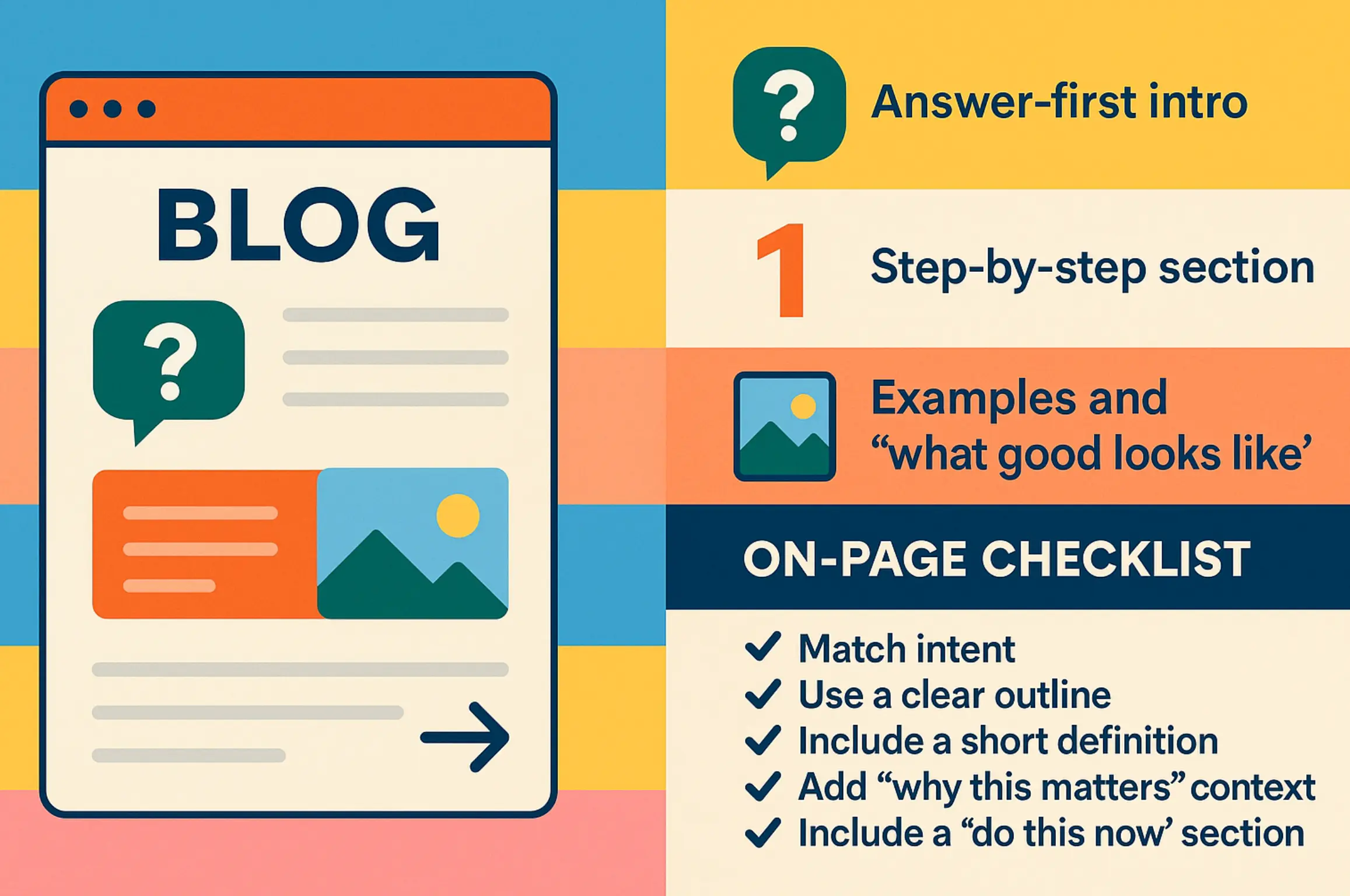
The blog post structure that tends to perform consistently
- Answer-first intro
- State the answer or core definition in the first few lines.
- Confirm what the reader will be able to do after reading.
- Step-by-step section
- Give a clear sequence, not a list of tips.
- Add decision points and common pitfalls.
- Examples and “what good looks like”
- Use short examples, screenshots, or sample wording.
- Make the standard concrete.
- Internal links and next steps
- Link to the most relevant service page or deeper resource.
- Give the reader a clear next action based on their situation.
Blog post on-page checklist (Practical)
- Match intent: informational queries should not read like a sales page.
- Use a clear outline: headings should mirror the way people ask questions.
- Include a short definition: readers and AI systems look for clean, quotable explanations.
- Add “why this matters” context: one short paragraph is enough.
- Include a “do this now” section: a checklist or short workflow.
- Link to one primary next step: guide the reader toward action without forcing it.
A blog post can win even if it never becomes a landing page. Its job is to build trust, capture demand early, and route the right readers to the right pages.
Titles, H1s, and headings: structure for humans + machines
Titles and headings are the fastest way to reduce ambiguity. They tell readers what the page is about, and they help search engines interpret the page’s main topic and subtopics.
Google also rewrites titles in search results when it thinks another source is more representative, so clarity and consistency matter. (Google Search Central)
Title tag vs H1: keep them aligned, not identical
- Title tag: written for the SERP. It should be specific and compelling without being promotional.
- H1: written for the page. It should confirm the topic and intent in plain language.
A practical pattern that works for many pages:
- Title tag: “On-Page SEO Guide: Service Pages and Blogs (2025)”
- H1: “On-Page SEO Guide: How to Optimize Service Pages and Blog Content”
Heading rules that keep pages scannable
- Use one H1.
- Use H2s for major sections and H3s for supporting sections.
- Keep headings descriptive. A heading like “Examples” is usually too vague.
- When helpful, phrase headings as questions that match real queries.
A simple test for headings
If a reader only skims your headings, they should still understand:
- What the page covers.
- Where to find the answer they came for.
- What to do next.
Snippet and CTR optimization: metas, intros, and “answer blocks”
In modern SERPs, your snippet is often your first impression. Even a strong page can underperform if the title and snippet do not match the query or the promise is unclear.
Google’s guidance on meta descriptions is straightforward: you can suggest a description, but Google may generate a different snippet based on the query and page content. (Google Search Central)
The “answer block” pattern (Practical)
For sections that target People Also Ask and AI summaries, use this format:
- One sentence definition (plain language, no jargon)
- Two to four bullets that expand the definition
- Then detail (examples, steps, pitfalls)
Example pattern:
- “On-page SEO is the practice of improving the content and page elements that help search engines and users understand what a page is about.”
- Bullets: intent match, structure, internal links, performance, trust
Meta description checklist
A strong meta description usually includes:
- The page topic in plain language.
- A clear benefit, not a slogan.
- A hint of what is included (checklist, framework, steps).
- Language that matches the query terms, without repetition.
If your page answers multiple related questions, focus the meta description on the primary intent. Do not try to cover everything in one snippet.
Internal linking that actually moves rankings: build a linking spine
Internal links do more than pass authority. They shape how search engines and readers move through your site, and they signal which pages you consider primary.
The most reliable internal linking strategies are designed, not improvised.
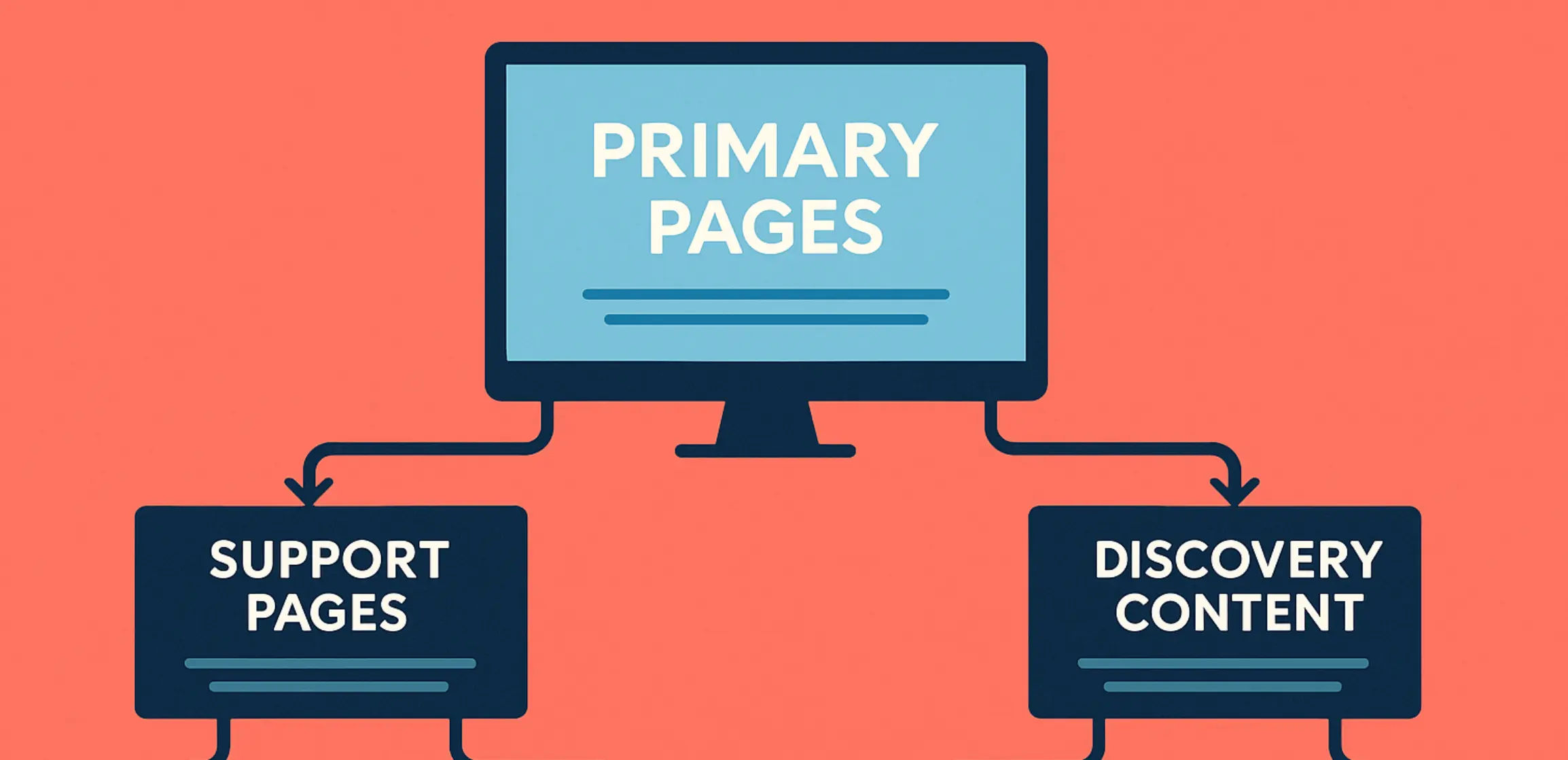
The linking spine model
Think of your site as three layers:
- Primary pages (money pages)
- Core service pages that represent your business value.
- Support pages
- Detailed guides, FAQs, comparison pages, or case highlights.
- Discovery content
- Blog posts that capture early-stage questions and long-tail queries.
The goal is simple: discovery content points to the relevant support pages and primary pages with clean anchor text, and primary pages point back to the best supporting resources.
Internal linking rules we use in practice
- Link to the next best page, not the most convenient page.
- Use descriptive anchor text that sets expectations.
- Avoid “breadcrumb” internal links that do not add value.
- Keep internal links close to the sentence they support.
If you want help designing a clean internal structure across service pages and content hubs, this is a core part of our on-page SEO services.
Content quality + core update alignment: what Google is rewarding
Most ranking volatility is not caused by one missing keyword. It is usually caused by pages that are unclear, thin, or difficult to trust in context. Google’s guidance is consistent: publish helpful, reliable content created for people. (Google Search Central)
What “people-first” looks like on a service page
- Clear scope and deliverables.
- Decision criteria, not vague promises.
- Evidence that you can do the work (examples, process detail, proof).
What “people-first” looks like in blog content
- Direct answers before deep detail.
- A structured path the reader can follow.
- Practical steps that reduce uncertainty.
Experience and trust signals you can add without overdoing it
- Mini examples and “what we see in audits” style insights.
- Clear definitions for technical terms.
- Updated information where it matters (tools, metrics, standards).
- Honest caveats when the answer depends on context.
If your content can be summarized accurately in a few sentences, you have a stronger chance of earning visibility across modern SERP features.
Structured data and entities: what to add (and what not to overpromise)
Structured data helps clarify what a page is about and can make your page eligible for rich results. It is not a guarantee, and it should not be treated as a shortcut.
Google’s structured data documentation is the safest baseline for implementation. (Google Search Central)
A practical, structured data approach by page type
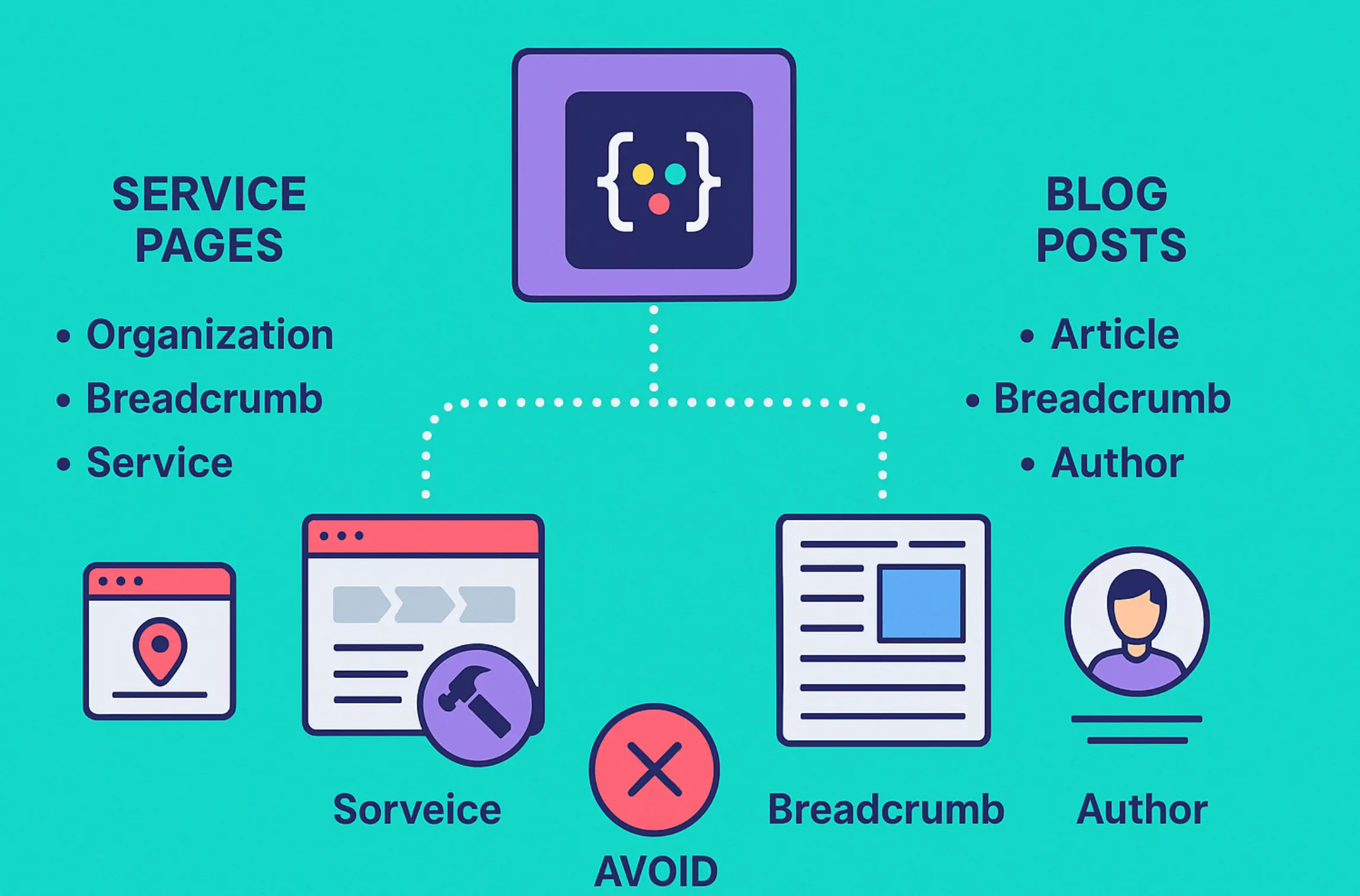
For service pages
- Organization or LocalBusiness markup (site-wide, where appropriate)
- Breadcrumb markup
- Service-related markup when it aligns with the visible content
For blog posts
- Article markup
- Breadcrumb markup
- Author and publisher details, where your CMS supports it cleanly
What to avoid
- Marking up content that is not visible on the page.
- Using schema to imply claims you do not support (reviews, ratings, credentials).
- Adding every schema type “just in case.” It increases complexity without clear value.
A simple rule: if you cannot maintain it, do not deploy it widely.
UX and performance basics that impact on-page results
On-page SEO performs best when the page loads quickly, behaves predictably, and feels easy to use. If performance is poor, you can still improve content signals, but you will often hit a ceiling.
Core Web Vitals are a durable way to think about real-world page experience. (web.dev)
Core Web Vitals (quick definitions)
- LCP: how quickly the main content appears.
- INP: how responsive the page feels to user interaction.
- CLS: how stable the layout is as it loads.
Practical performance wins that are common on service pages
- Compress and properly size above-the-fold images.
- Reduce heavy scripts that block rendering.
- Avoid layout shifts from late-loading fonts, banners, and injected elements.
- Keep forms and popups respectful, especially on mobile.
For sites that need deeper technical work, this connects directly to a technical SEO foundation that keeps crawlability, performance, and indexation clean.
FAQ: on-page SEO for service pages + blogs (PAA capture)
What is on-page SEO in plain language?
On-page SEO is the practice of improving the content and page elements that help search engines and people understand what a page is about. It includes intent match, structure, internal links, and performance.
What is the difference between on-page SEO and technical SEO?
On-page SEO focuses on content and on-page signals (titles, headings, copy, links, schema). Technical SEO focuses on crawlability, indexation, performance, and site architecture that allow on-page signals to be fully recognized.
Should service pages and blog posts target the same keywords?
They can target related topics, but they should not target the same primary intent. Service pages are built for hire intent, while blog posts are built for informational intent that supports the buyer journey.
How do I avoid keyword cannibalization?
Assign one primary query intent to one primary URL. If multiple pages compete, consolidate or differentiate intent, then rewire internal links so the site clearly points to the primary page.
How many H1 tags should a page have?
One H1 is the cleanest standard. It keeps the page’s main topic unambiguous and improves structure for readers and search engines.
Do meta descriptions matter if Google rewrites snippets?
Yes, because your description is still a strong candidate for the snippet when it matches the query well. It also forces you to articulate the page’s promise clearly.
Does schema improve rankings?
Schema primarily helps search engines understand content and can support rich result eligibility. It is not a guaranteed ranking boost, and it works best when content quality and intent match are already strong.
What should be above the fold on a service page?
A clear description of the service and outcome, who it is for, one primary CTA, and a small trust signal. Keep it focused and scannable.
How long should a service page or blog post be?
Length should be driven by the intent and competitive depth. Service pages should be complete enough to answer buyer questions, while blog posts should fully satisfy the query without padding.
How do I optimize content for AI summaries and answer features?
Write in extractable sections: clear definitions, tight paragraphs, question-based headings where relevant, and specific supporting detail. Make your claims easy to verify and avoid vague statements.
If you want help implementing these on-page improvements across your highest-value pages, we can support the strategy and execution through our on-page SEO support. We focus on durable changes you can measure and maintain, not one-off edits.