





Header structure is one of the simplest on-page SEO levers that still gets misused. When H1s, H2s, and H3s don’t line up with what the page is actually about, readers scan past, and search engines get mixed signals.
In 2026-era search, structure is not just about classic rankings. It is also about eligibility for AI summaries, featured answers, and “People Also Ask” expansions. Clear headings make your page easier to understand, easier to navigate, and easier to extract.
Quick Rules: H1, H2, and H3 Best Practices
If you only fix a few things, fix these.
- One page, one primary topic, one clear H1. The H1 should name the page’s core subject in plain language.
- Use H2s as the main sections that support that topic. Each H2 should answer a meaningful sub-question or decision point.
- Use H3s only when an H2 needs a sub-structure. H3s are best for steps, criteria, examples, or variations inside a section.
- Do not skip levels. Avoid jumping from H2 to H4 because a template “looks right.”
- Write headings that still make sense out of context. Search can surface a section without the rest of the page, and headings should hold up on their own.
- Headings are for structure, not styling. If you use headings as design elements, the hierarchy becomes noise.
A fast self-check: if someone skimmed only your headings, would they understand what the page covers and where to find specific answers?
Why Headings Still Matter in 2026
Headings are not a cosmetic detail. They are part of how humans and systems interpret your content.
Google’s guidance consistently comes back to usefulness and clarity, not tricks. Pages that are easy to understand tend to perform better over time because they match intent more cleanly and reduce friction for readers. If you want a “north star” for quality, start with Google’s guidance on creating helpful, reliable, people-first content.
We use a simple framework when we audit heading structure.
The 3-Layer Heading Model
1) Navigation layer (humans)
- People do not read linearly. They scan, then commit to a section that looks relevant.
- Good headings reduce pogo-sticking by helping readers self-select the right section fast.
- Clear headings also make it easier for teammates to review and update content later.
2) Semantics layer (accessibility and structure)
- Headings create a logical outline of a page. Screen readers use that outline to help users navigate.
- The W3C’s accessibility guidance is direct: headings should be nested by rank, and each level should represent the relationship between sections and subsections. See the W3C WAI headings tutorial.
3) Extraction layer (search features and AI surfaces)
- Search results increasingly pull section-level answers, not just page-level snippets.
- A clean structure makes it easier for systems to find the best paragraph, list, or definition for a specific query.
If your headings fail any one of these layers, the page usually feels “off” to users, even if the content is technically accurate.

H1 Best Practices
Your H1 is the promise of the page. It tells a reader, and a crawler, what the page is about in one line.
What A Strong H1 Does
- Matches the real intent of the page. Not the category label in your CMS.
- Uses plain language. “Services” is not a topic. “Technical SEO for E-Commerce Sites” is a topic.
- Stays specific without stuffing. You can include a primary keyword, but keep it readable.
A Practical H1 Formula
Use this when your team needs consistency:
Topic or Service + Qualifier + (Optional) Audience or Location
Examples:
- “On-Page SEO Checklist for Service Pages”
- “Local Landing Page Structure for Toronto Businesses”
- “How to Fix Heading Hierarchy on WordPress Sites”
H1 Guardrails
- Keep it short enough to scan, but specific enough to be meaningful.
- Avoid repeating navigation labels (“Blog,” “Resources”) as the H1 unless the page is genuinely a blog index.
- If a template forces a logo or widget into an H1, fix the template rather than accepting a broken hierarchy.
H2 Best Practices
H2s carry most of the structure on a page. Think of them as your table of contents, written as readable headlines.
What Strong H2s Look Like
- They are parallel. If one is a “How to…” heading, do not make the next one “Benefits of…” unless it serves a clear flow.
- They are specific. “More Information” is a dead end.
- They support one page goal. If the page is about header structure, every H2 should connect back to that.
H2 Writing Patterns That Work
- Problem → Solution → Proof → Next Step (great for service pages)
- Definition → Steps → Mistakes → Examples (great for guides)
- Option A vs Option B → Decision Criteria → Recommendation (great for comparisons)
A practical tip: the first one to two sentences under an H2 should answer the heading directly. It improves clarity for readers and tends to create snippet-ready sections.
H3 Best Practices
H3s are your “subfolders.” They should only appear when you truly need a sub-structure inside an H2.
When H3s Make Sense
- A step-by-step process inside an H2
- A list of criteria, scenarios, or variations
- A set of mini examples or mini FAQs inside a larger section
H3 Guardrails
- Avoid using H3s to create visual spacing. If spacing is the goal, that is a CSS problem, not a structure problem.
- Keep H3s consistent within a section. If you start with verbs (“Audit,” “Fix,” “Verify”), keep that pattern.
- Do not over-nest. Most pages do not need H4-H6 unless they are long technical docs.
Headings vs Headers
People often say “header tags” when they mean headings. It matters because the terms refer to different things.
- Headings are the HTML elements <h1> through <h6>. They define the outline of your content.
- A header often refers to the top section of a page template (logo, navigation, hero), or the HTML <header> element used as a layout landmark.
You can have a header area that contains headings, but they are not the same thing. When you audit “header structure,” make sure you are looking at heading tags, not the visual header.
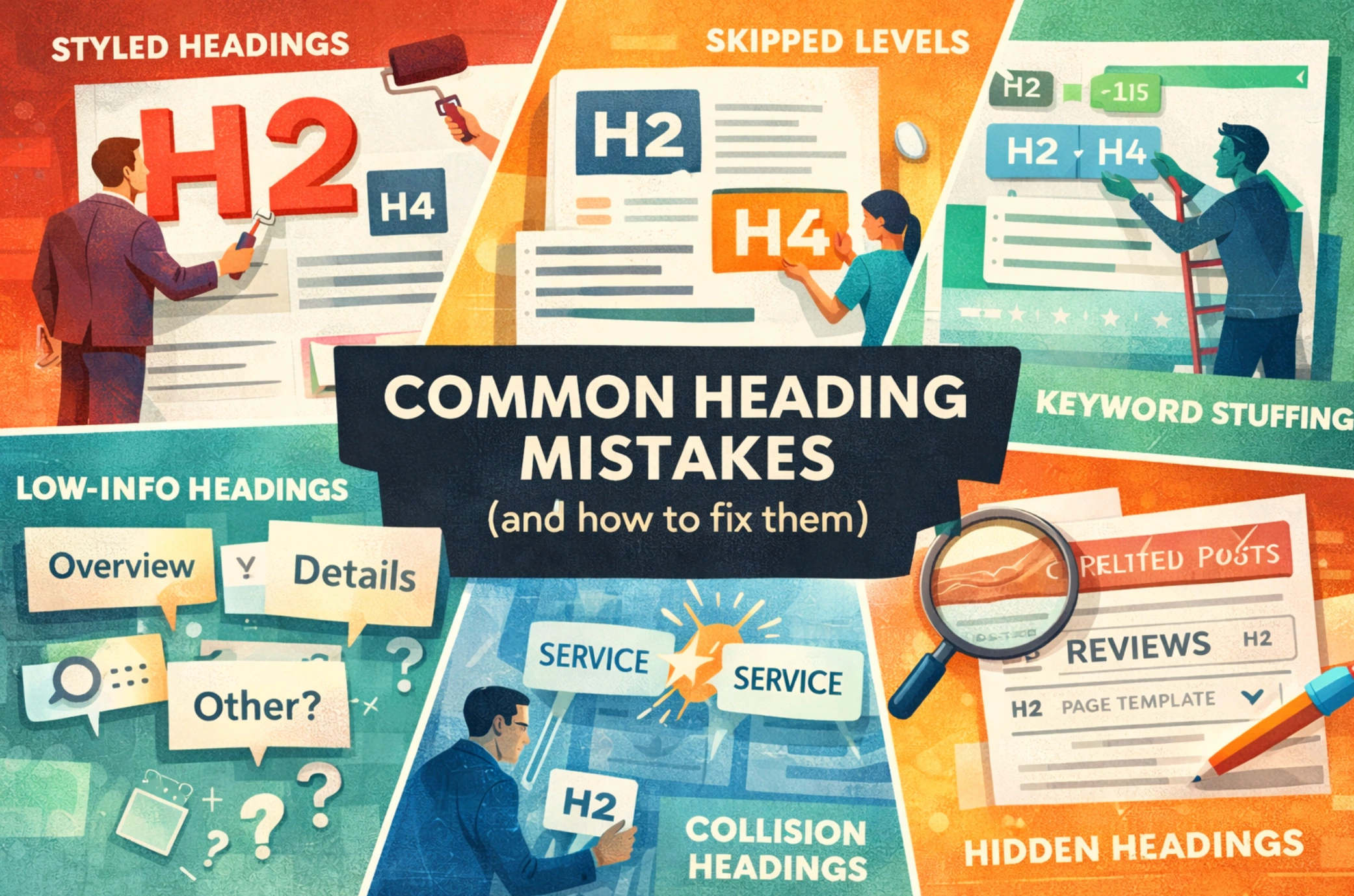
The Most Common Heading Mistakes (And How to Fix Them)
These are the patterns we see most often in real audits.
- Headings used for styling
- What it looks like: random H2s for big text, H4s for small text
- Fix: rebuild styles in CSS; keep headings for structure only
- Skipped levels (H2 → H4)
- What it looks like: “it’s fine because it looks right”
- Fix: map the outline first, then apply levels consistently
- Low-information headings
- What it looks like: “Overview,” “Details,” “More,” “Other”
- Fix: rewrite headings as outcomes or questions
- Keyword-stuffed headings
- What it looks like: repetitive city or service terms in every heading
- Fix: use one clear primary phrase and then vary naturally by subtopic
- Multiple sections that answer the same thing
- What it looks like: two H2s that both describe the same service or definition
- Fix: consolidate; one strong section beats two thin ones
- Accordion and tab headings done incorrectly
- What it looks like: headings hidden behind UI that is not crawlable or accessible
- Fix: ensure the HTML still contains a coherent outline; test rendered HTML
- Template-generated headings in repeatable components
- What it looks like: “Related Posts” or “Reviews” as H2 on every page
- Fix: demote those headings or change them to non-heading elements
- H1 mismatch with the title and intro
- What it looks like: H1 says “Solutions,” intro talks about “Technical SEO,” title tag targets something else
- Fix: align the page around one intent, then update all three together
The “Multiple H1” Question: Decision Criteria, Not Dogma
You will see conflicting advice here, mostly because different platforms generate headings differently. HTML standards can allow multiple <h1> elements in certain structures, but “allowed” and “recommended” are not the same.
For most marketing and service pages, the cleanest approach is still one clear H1 that represents the primary topic.
A Simple Decision Tree
Step 1: Does the page have one primary topic?
- If yes, use one H1 that names it.
- If no, the page is doing too much. Split it into separate pages or restructure it as a hub.
Step 2: Are multiple H1s coming from the template?
- If yes, treat it as a template issue, not a content issue. Fix the component or change the markup.
Step 3: Is this a complex application page (dashboard, knowledge base, docs)?
- If yes, you may have legitimate structural reasons for multiple top-level headings.
- Even then, aim for a clear “main” heading that represents the primary content area.
In practice, teams choose one H1 because it reduces ambiguity for content updates, audits, and migrations. It also keeps the outline predictable across a site.
How to Audit Your Heading Structure (10-Min Page Audit + Site-Wide QA)
A good heading audit is fast, repeatable, and tied to action. Here is the approach we use before we touch copy.
The 10-Min Page Audit Checklist
- Confirm the page intent in one sentence.
- List headings only (H1-H3). You should see a logical outline.
- Check for one clear H1.
- Check H2 coverage: do the H2s cover the main subtopics a reader expects?
- Check nesting: do H3s sit under the right H2?
- Scan headings for meaning: would they make sense if shown alone in search?
- Look for repeats and filler: “Overview” and “More Info” are rewrite targets.
- Check for template noise: repeating sidebar widgets as headings.
- Spot cannibalization risks: overlapping sections that should be merged.
- Write the fix list: what to rename, what to merge, what to demote, what to move.
If you are dealing with larger sites, you need site-wide QA. That usually means crawling heading tags, flagging duplicates and missing H1s, and enforcing template rules release after release. This is often part of technical SEO work because the root cause is usually the theme or component library, not the writer.
Mini Example (Anonymized): Before and After
Before (hard to scan, mixed intent):
- H1: “Services”
- H2: “What We Do”
- H2: “Our Process”
- H2: “SEO”
- H3: “Toronto”
- H3: “Canada”
After (clear topic, cleaner hierarchy):
- H1: “On-Page SEO Services in Toronto”
- H2: “What On-Page SEO Includes”
- H2: “Common On-Page Issues We Fix”
- H2: “How We Implement Changes”
- H2: “FAQs”
- H3: “How long do on-page updates take to show?”
- H3: “Do you update headings and internal links?”
The improvement here is not “more keywords.” It is a clearer promise, clearer sections, and a layout that supports both readers and audits.
Heading Templates That Work
Templates help teams scale quality. They also prevent every page from becoming a one-off.
Below are heading patterns we see work consistently across Toronto and Canada-focused sites, where intent and location cues need to be present but not forced.
Template 1: Service Page (Single Intent)
- Main page title should state the service and who it’s for
- H2s should mirror the buyer’s evaluation flow (what it is, why it matters, what’s included, how it works, FAQs)
Suggested structure:
- H1: “{Service} for {Audience} in Toronto” (only when location is relevant)
- H2: “What {Service} Covers”
- H2: “Who This Is For”
- H2: “Common Problems We Fix”
- H2: “Method and QA Process”
- H2: “FAQs”
This pairs naturally with on-page SEO strategy and execution because headings, internal links, and section clarity are core to making each page a clean answer.
Template 2: Location Page (Local Intent)
Location pages often fail when they are thin or when every location uses identical headings with only the city swapped. Structure should reflect real local buyer questions.
Suggested structure:
- H1: “{Service} in {Neighbourhood/City}”
- H2: “Services Offered in {City}”
- H2: “Service Area”
- H2: “Pricing or How Quotes Work”
- H2: “Directions, Parking, and Transit”
- H2: “FAQs”
If you are building or cleaning up location page templates, align it with your local SEO program so headings, NAP signals, and internal links reinforce each other.
Template 3: Long-Form Guide (Pillar Content)
For educational content, structure should match how people learn: definition, framework, steps, mistakes, examples, and FAQs.
Suggested structure:
- H1: “{Topic} Best Practices”
- H2: “At a Glance”
- H2: “Why It Matters Now”
- H2: “Framework”
- H2: “Step-by-Step Implementation”
- H2: “Mistakes and Fixes”
- H2: “Templates”
- H2: “FAQ”
This is the foundation of a sustainable content marketing strategy because it keeps output structured, consistent, and refreshable.
Template 4: Comparison or Decision Page
These pages win by answering the real decision criteria, not by padding copy.
Suggested structure:
- H1: “{Option A} vs {Option B}: Which Fits?”
- H2: “Quick Comparison”
- H2: “Differences That Matter”
- H2: “Best Fit Scenarios”
- H2: “FAQs”
Headings for AI Overviews, PAA, and Featured Answers
AI summaries and “People Also Ask” results reward clarity, completeness, and extractable sections. Your headings are the scaffolding that helps systems find the best part of your page.
Google’s own guidance on how AI features interact with websites is worth reading if you publish content at scale: AI features and your website.
Practical Structure Patterns That Help
Use question-style headings where it fits.
- If a query is likely to be phrased as a question, make the heading a question.
- Then answer it in one to two sentences immediately under the heading.
Front-load the answer, then support it.
- Start with a direct statement.
- Follow with steps, examples, or a short list.
Use lists for steps and criteria.
- Lists are easy for readers to scan.
- They are also commonly used in featured answer formats.
Keep sections self-contained.
- Avoid “as mentioned above.”
- Define pronouns and terms so the section makes sense if it’s surfaced alone.
Featured snippets still matter because they influence visibility and clicks, and they can appear in “People Also Ask.” Google documents how they work in Featured snippets and your website.
A Reality Check on Clicks
As AI summaries become more common, clicks do not always behave the way they did in classic SERPs. Pew Research found that when an AI summary appeared, users clicked traditional results less often than when no AI summary was shown in their analysis of March 2025 browsing behaviour. See the Pew Research Center write-up.
This is one reason we focus on headings that do two jobs at once: they help you rank, and they help you be cited or referenced accurately in AI-driven results. That work typically sits inside an AI readiness service, where structure, citations, and entity clarity all tie together.

How to Measure Whether Heading Fixes Worked
Heading improvements are measurable, but you need to look in the right places and give changes time to be crawled and reflected in query patterns.
What to Track (And Why)
- Search Console queries and pages: Are you earning impressions for the right intents after restructuring?
- Click-through rate (CTR): Clearer titles and headings can improve snippet alignment, which can influence CTR.
- Engagement signals: Time on page, scroll depth (if you track it), and conversion rate on the page’s primary CTA.
- Indexing and coverage: If heading issues were tied to template problems, you may also see improvements in crawl behaviour after cleanup.
How to Run the Measurement Cleanly
- Annotate the release date and the set of URLs changed.
- Compare performance in consistent windows (for example, 28 days before vs 28 days after) and control for seasonality where possible.
- Review the SERP for your primary queries. Are competitors using different section patterns that you still need to cover?
If performance changes line up with a broad algorithm shift, do not panic-edit headings in isolation. Google’s documentation on core updates is clear that the right response is usually a quality and intent review across the page, not a single mechanical tweak.
FAQs
Should every page have exactly one H1?
For most marketing pages, yes. One clear H1 makes the page easier to audit, easier to maintain, and easier to align with a single intent. Pages with complex app-style layouts may be exceptions, but they should still have a clear primary heading.
Do headings directly improve rankings?
Headings are not a magic switch. They support relevance and usability by making the page easier to understand and by clarifying topic coverage. That can improve performance over time when the content also satisfies intent.
Should I put keywords in every heading?
No. Use the main topic in the H1 and let supporting headings describe the subtopics naturally. Repeating the same phrase across headings usually reads poorly and adds little value.
Is it okay to skip from H2 to H4 if the design looks better?
It is better to keep the outline logical and fix design with CSS. Skipped levels create a confusing structure for accessibility and make audits harder.
How long should headings be?
Long enough to be specific, short enough to scan. If a heading needs a full sentence to be clear, that is sometimes fine, but most headings should be a tight phrase.
What about headings inside accordions and tabs?
They can work if the content is rendered in the HTML and the structure remains coherent. Test what search engines see in the rendered DOM, and ensure the headings still make a logical outline.
Do headings matter for AI Overviews and “People Also Ask”?
They can. Clear, question-aligned headings with direct answers beneath them make it easier for systems to extract accurate sections. It also helps readers find the exact answer faster.
Should my H1 match my title tag exactly?
Not necessarily. They should align in meaning and intent, but they do not have to be identical. The best pair reads naturally and sets consistent expectations for the reader.
If you want help turning heading structure into a repeatable, site-wide standard, we can audit templates, fix hierarchy issues, and build scalable page models as part of our on-page SEO services.