





Design system

Style guide

Every variable, class and component this site is built from, drawn by the site’s own styles. Start here before you build or change anything.

How to use this page
Four habits that keep the site consistent.
01
Find it
Use the list of sections. Every variable, class and component this site uses is on this page, grouped by kind.
02
Read a row
On the left: the name as the Designer shows it, the CSS class, and what it is bound to. On the right: the real thing, drawn by the site’s own styles.
03
Reuse before you add
Building something new? Look here first, and use the variable or class that already exists.
04
Add it here
A new class or component gets its row here in the same piece of work, so nothing is lost when unused styles are cleaned up.
At a glance
Counted from the site’s variables and CSS each time this page is generated.
177
Variables
8
Variable collections
358
Classes and combos
4
Breakpoints
Font
Set in Typography Scale. Every text role reads its family from there.
Inter
Variables
A mode is a second set of values for the same variables: a theme, a breakpoint or a text role.
Collection
Variables
Modes
Colors
25
Base
Colors Semantic
16
Base · Dark
Typography Scale
37
Base
Typography Role
65
Base · Tablet · Mobile Landscape · Mobile
Typography Styles
5
Base · Display · H1 · H2 · H3 · H4 · H5 · H6 · Body Large · Body Small · Label · Button · Caption
Layout
8
Base · Tablet · Mobile Landscape · Mobile
Spacing
13
Base
Radius
8
Base
Breakpoints
Styles are set on Desktop and passed down. A smaller breakpoint only holds what changes.
Breakpoint
Applies at
Desktop
992px and wider
Tablet
991px and narrower
Mobile landscape
767px and narrower
Mobile
479px and narrower
02

Colors

The raw palette. Where a theme role exists for the job (a background, a text colour, a border), use the role and not the colour itself.

Colors / Brand
9 variables
Ink
#200f09
Paper
#ffffff
Accent
#f84c1c
Cream
#f7f3f3
Espresso
#1c0e09
Sand
#fcfaf9
Taupe
#8c7f77
Taupe Light
#a99a90
Accent Dark
#e03f12
Colors / Ink Tint
9 variables
Ink 4
#200f090a
Ink 12
#200f091f
Ink 24
#200f093d
Ink 48
#200f097a
Ink 64
#200f09a3
Ink 8
#200f0914
Ink 20
#200f0933
Ink 32
#200f0952
Ink 80
#200f09cc
Colors / Paper Tint
7 variables
Paper 12
#ffffff1f
Paper 24
#ffffff3d
Paper 48
#ffffff7a
Paper 64
#ffffffa3
Paper 4
#ffffff0a
Paper 18
#ffffff2e
Paper 72
#ffffffb8
03

Themes

A theme is one mode of the semantic colours. Put its class on a section and everything inside follows: backgrounds, text, borders and buttons.

Base
.section
Colors Semantic → Base
Heading on this theme

Text / Primary on Background / Page. Text / Secondary.A link.

Button
Contact Form
.contact-form
Colors Semantic → Base
Heading on this theme

Text / Primary on Background / Page. Text / Secondary.A link.

Button
CTA Panel
.cta-panel
Colors Semantic → Dark
Heading on this theme

Text / Primary on Background / Page. Text / Secondary.A link.

Button
Section Is Dark
.section.is-dark
Colors Semantic → Dark
Heading on this theme

Text / Primary on Background / Page. Text / Secondary.A link.

Button
Semantic colours
What each role points at, per mode
Variable
Base
Dark
Background/Page
Brand / Paper
Brand / Espresso
Background/Surface
Brand / Cream
Paper Tint / Paper 4
Background/Overlay
Ink Tint / Ink 48
Ink Tint / Ink 64
Background/Tinted
Brand / Sand
Paper Tint / Paper 4
Text/Primary
Brand / Ink
Brand / Cream
Text/Secondary
Ink Tint / Ink 80
Paper Tint / Paper 72
Text/Accent
Brand / Accent
Brand / Accent
Text/Muted
Ink Tint / Ink 64
Paper Tint / Paper 64
Text/Soft
Brand / Taupe
Brand / Taupe Light
Text/Faint
Ink Tint / Ink 32
Paper Tint / Paper 48
Border/Subtle
Ink Tint / Ink 8
Paper Tint / Paper 18
Button/Background
Brand / Accent
Brand / Accent
Button/Text
Brand / Paper
Brand / Paper
Button/Background Hover
Brand / Accent Dark
Brand / Accent Dark
Form/Focus
Brand / Accent
Brand / Accent
Link/Hover
Brand / Accent
Brand / Accent
04

Typography

One class per text role. Sizes change per breakpoint through variables, so a text element needs one class and no overrides.

D0
.d0
Display role. Size 64 → 56 → 48 → 44, desktop to mobile.
The quick brown fox
D1
.d1
H1 role. Size 64 → 56 → 44 → 40, desktop to mobile.
The quick brown fox
D2
.d2
H2 role. Size 56 → 44 → 36 → 36, desktop to mobile.
The quick brown fox
D3
.d3
H3 role. Size 24 → 22 → 22 → 20, desktop to mobile.
The quick brown fox jumps over the lazy dog
D4
.d4
H4 role. Size 20.
The quick brown fox jumps over the lazy dog
D5
.d5
H5 role. Size 17.
The quick brown fox jumps over the lazy dog
D6
.d6
H6 role. Size 16.
The quick brown fox jumps over the lazy dog
Body L
.body-l
Body Large role. Size 18 → 18 → 17 → 17, desktop to mobile.
The quick brown fox jumps over the lazy dog
Body S
.body-s
Body Small role. Size 14.
The quick brown fox jumps over the lazy dog
Chip
.chip
Body Small role. Size 14.
The quick brown fox jumps over the lazy dog
Label Text
.label-text
Label role. Size 13.
The quick brown fox jumps over the lazy dog
Button
.button
Button role. Size 16.
The quick brown fox jumps over the lazy dog
Caption
.caption
Caption role. Size 13.
The quick brown fox jumps over the lazy dog
All H1 Headings
h1
Tag style · H1

The quick brown fox

All H2 Headings
h2
Tag style · H2

The quick brown fox

All H3 Headings
h3
Tag style · H3

The quick brown fox jumps over the lazy dog

All H4 Headings
h4
Tag style · H4

The quick brown fox jumps over the lazy dog

All H5 Headings
h5
Tag style · H5
The quick brown fox jumps over the lazy dog
All H6 Headings
h6
Tag style · H6
The quick brown fox jumps over the lazy dog
All Paragraphs
p
Tag style

The quick brown fox jumps over the lazy dog

All Links
a
Tag style

A paragraph with a link in it.

Type scale
37 variables
Variable
Value
Family/Base
Inter
Size/12
0.75em · 12px
Size/14
0.875em · 14px
Size/16
1em · 16px
Size/18
1.125em · 18px
Size/20
1.25em · 20px
Size/24
1.5em · 24px
Size/32
2em · 32px
Size/40
2.5em · 40px
Size/48
3em · 48px
Size/64
4em · 64px
Size/80
5em · 80px
Size/96
6em · 96px
Size/13
0.8125em · 13px
Size/15
0.9375em · 15px
Size/17
1.0625em · 17px
Size/22
1.375em · 22px
Size/36
2.25em · 36px
Size/44
2.75em · 44px
Size/56
3.5em · 56px
Weight/Regular
400
Weight/Medium
500
Weight/Bold
700
Weight/Semibold
600
Line Height/Tight
1.04
Line Height/Snug
1.3
Line Height/Normal
1.56
Line Height/None
1
Line Height/Relaxed
1.64
Letter Spacing/Tight
-0.02em · -0.32px
Letter Spacing/Normal
0em · 0px
Letter Spacing/Wide
0.08em · 1.28px
Letter Spacing/Snug
-0.01em · -0.16px
Letter Spacing/Tighter
-0.03em · -0.48px
Letter Spacing/Condensed
-0.04em · -0.64px
Letter Spacing/Compressed
-0.06em · -0.96px
Letter Spacing/Ultra
-0.08em · -1.28px
05

Utilities

Single-purpose classes for a one-off change. Add one next to a type class before making a new combo.

Size
1 class
Size 15
Weight
1 class
Weight Medium
Leading
1 class
Leading Tight
Tracking
1 class
Tracking Wide
Text
6 classes
Text Secondary
Text Soft
Text Accent
Text Faint
Text Muted
Text Uppercase
Max Width
1 class
Max Width Text
06

Spacing, radius and layout

The values every gap, padding, corner and container comes from. Pick one of these before typing a number.

Spacing
13 variables
Variable
Value
Size
None
0em · 0px
Hairline
0.0625em · 1px
2
0.125em · 2px
4
0.25em · 4px
8
0.5em · 8px
12
0.75em · 12px
16
1em · 16px
24
1.5em · 24px
32
2em · 32px
48
3em · 48px
64
4em · 64px
96
6em · 96px
128
8em · 128px
Radius
8 variables
None
0em · 0px
2
0.125em · 2px
4
0.25em · 4px
8
0.5em · 8px
Pill
999em · 15984px
10
0.625em · 10px
12
0.75em · 12px
20
1.25em · 20px
Layout
Per breakpoint
Variable
Base
Tablet
Mobile Landscape
Mobile
Section/Padding V
7.5em · 120px
5.5em · 88px
4.5em · 72px
4em · 64px
Section/Padding H
6.875em · 110px
2.5em · 40px
1.5em · 24px
1.25em · 20px
Container/Max Width
98.75em · 1580px
98.75em · 1580px
98.75em · 1580px
98.75em · 1580px
Content/Gap
3em · 48px
2.5em · 40px
2em · 32px
1.5em · 24px
Nav/Height
5.5em · 88px
4.5em · 72px
4em · 64px
4em · 64px
Nav/Padding H
3.125em · 50px
2.5em · 40px
1.5em · 24px
1.25em · 20px
Button/Height
3em · 48px
3em · 48px
3em · 48px
3em · 48px
Rail/Inset
3.75em · 60px
1.25em · 20px
0.75em · 12px
0.5em · 8px
07

Buttons and links

Every button and link style, with its variants. States (hover, focus, pressed) are named in each note.

Button
.button
Primary button. Hover darkens the fill, pressed darkens it more, keyboard focus shows a ring. Disabled is 40% opacity (repo CSS).
Button Has Icon
.button.has-icon · .button-chip
Primary with the arrow chip (Button Chip, a div inside).
Button Is Small
.button.is-small
The nav button: lower, flat, 15px.
Button Is Secondary
.button.is-secondary
Cream fill, ink text. Hover: an ink tint.
Button Is Pill
.button.is-pill
Outlined pill with an icon, in the footer.
Button Is Glass
.button.is-glass · .nav-contact
Blurred dark glass, on the hero. With the combo Nav Contact (the nav button) it hides at 991 and down.
Button Is Light
.button.is-light
Cream button for dark panels.
Icon Button
.icon-button
Square accent button holding one icon.
Nav Link and Nav Toggle
.nav-link · .nav-toggle
Nav items (a link, or a button with a caret for a dropdown) and the menu button shown at 991 and down (Is Flex shows it here).
Case Studies
Read More
.read-more · .read-more-icon · .read-more-panel
Opens the panel under it; the label changes to Read less and the caret flips (repo CSS). Is Light and Read More Icon Is Inherit are for dark backgrounds.

The first sentences of a paragraph.

The rest of it, shown when open.

Text Link
.text-link.link-underline
A link inside body text: accent colour, a faint line at rest and a full line that wipes in on hover (Link Underline, repo CSS).

Our sister agency Brand Vision brings expertise in brand development.

Footer, legal and social links
.footer-link · .legal-link · .social-link
Footer Link (Is Strong for the phone and email), Legal Link in the bottom bar, Social Link for an icon.
08

Forms

Fields, labels and messages as they look inside a form.

Contact Form
.form · .contact-form · .form-row · .form-field · .form-input
The contact form's parts. Form Input: border on hover, accent border on focus, a ring on keyboard focus; Is Select adds the caret, Is Textarea the height. Disabled is 40% opacity (repo CSS).

Tell us about your business

Free consultation · Reply within one business day

Semrush Certified Agency PartnerUpCity

Form Message: success and error copy to come.

Thank you! Your submission has been received!
Oops! Something went wrong while submitting the form.
09

Components

Reusable blocks. In Webflow each one is a component: insert an instance, never copy the markup.

Hero Card
.hero-card
The research card in the hero: a Link Block; anywhere on it gives the button its hover look and zooms the image (repo CSS).
Stat
.stat
A number with its label, in the stats band. The number counts up from 0 (count-up module).

10+

Years of senior SEO consulting

Toronto-based senior team

Tab Card
.tab-card
A services tab. Is Active is set by the tabs module; the bar on its left edge fills while its turn lasts.
Service Card
.service-card
The white card on a service stage.
1

Organic Search Growth

We build organic growth around traffic that can bring relevant enquiries and sales. Our SEO consultants investigate where your website is missing opportunities and what competing sites do well. Technical SEO improves how search engines access important pages, while content development helps those pages attract and inform prospective customers.

Explore Organic Growth
Pillar
.pillar
One of the three reasons under Why SEO Team.

Thought Leaders 
in SEO & GEO

SEO Team’s published research draws on years of hands-on SEO experience. We examine major campaigns to understand what drove their performance and how those lessons apply as search evolves.

Glass Card
.glass-card
A product card on the AI panel, with its ribbed banner and Name Pill. Sits on Glow Panel.

Vantage

Vantage reviews SEO and paid media campaign data every day.

Case Card Is Dark
.case-card.is-dark
Plum card with the glow (Dark mode).
Enterprise retail techTechnical SEO

Rebuilding site speed for a large product catalogue

94%

Core Web Vitals pass rate, up from 62%

Before · 62%
After · 94%
Chrome UX Report · 2025Read the Case Study
Case Card
.case-card
The light case card.
Toronto custom home builderLocal SEO

Turning map views into consultation calls

+210%

Qualified consultation requests

3.1×GBP calls

+18Top-3 rankings

Google Business Profile · 2025Read the Case Study
Case Card Is Photo
.case-card.is-photo
A card on a photograph, with S Bg Blur behind the text (Dark mode).
Toronto career nonprofitNonprofit

Program pages that people, and donors, can find

+150%

Organic traffic

Line chart of organic traffic rising over twelve months
GA4 · 12 monthsRead the Case Study
Industry Tile
.industry-tile
An industry link on Glow Panel Is Neutral. Hover tints it and fills the chip.
Author Row
.author-row
The authors line under the research heading.

Authors

Reports by our data specialists

Reviewed by senior SEO consultants

FAQ Item
.faq-item
A question that opens its answer in place (faq module).

Contact List
.contact-list
Phone, email and address on the contact panel.
10

Page sections

Whole sections at half size. Each is removed from here once its page is built.

Case Feature
.case-feature
The featured case study.
A bronze statue of Lady Justice on a desk beside a gavel

ClientToronto personal injury law firm

+168%

Non-brand organic traffic

GA4 / Search Console · 12 months
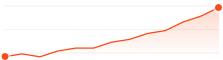
Line chart rising steadily from January to December
Featured case studyLegal12-month engagement

Turning non-brand search into a steady source of new cases

Challenge

Most enquiries came from people who already knew the firm by name.

What we did

Rebuilt practice-area pages around real client questions and fixed crawl issues across the site.

Result

A steady flow of first-time enquiries from people searching for help, not the firm.

Read the Case Study
11

Other classes

Classes with no specimen above. They are applied here so Webflow’s “Clean up unused styles” can’t delete them.


Kept for cleanup
143 classes or combos not shown above. Each is applied here so Webflow's “Clean up unused styles” can't delete it.
CTA Glow Is One
.cta-glow.is-one
Rule
.rule
Label
.label
Stats Band
.stats-band
FAQ Column
.faq-column
Logo Row
.logo-row
Hero Grid
.hero-grid
Split Head
.split-head
FAQ Grid
.faq-grid
CTA Content
.cta-content
Hero Content
.hero-content
Utility Page Wrap
.utility-page-wrap
S Bg Overlay Is Gradient
.s-bg-overlay.is-gradient
Section Is Media
.section.is-media
CTA Texture
.cta-texture
CTA Glow Is Two
.cta-glow.is-two
Section Is Flush
.section.is-flush
Skip Link
.skip-link
Logo Tile Img
.logo-tile-img
Logo Tile
.logo-tile
Split Head Aside
.split-head-aside
Logo Strip
.logo-strip
Section Is Hero
.section.is-hero
S Wrapper Is Wide
.s-wrapper.is-wide
Article Grid
.article-grid
Hero Lead
.hero-lead
Stats Grid
.stats-grid
Heading Stack
.heading-stack
To Slot
.to-slot
Logo Strip Label
.logo-strip-label
Eyebrow
.eyebrow
CTA Intro
.cta-intro
Section Is Tinted
.section.is-tinted
S Rails
.s-rails
Trust Block
.trust-block
Logo Tiles
.logo-tiles
Logo Band
.logo-band
G | Main
.g-main
CTA Glow
.cta-glow
Logo Row Img
.logo-row-img
Eyebrow Rule
.eyebrow-rule
Eyebrow Is Quiet
.eyebrow.is-quiet
Section Is Top
.section.is-top
Contact Form Block
.contact-form-block
Utility Page Content
.utility-page-content
Section Is Ruled
.section.is-ruled
G | Components
.g-components
Section Is Proof
.section.is-proof
S Bg Overlay Is Dim
.s-bg-overlay.is-dim
Stat Is Row Two
.stat.is-row-two
Stat Is Row Start
.stat.is-row-start
S Bleed
.s-bleed
Section Is Roomy
.section.is-roomy
Section Is Snug
.section.is-snug
Lead
.lead
Lead Grid
.lead-grid
Lead Grid Main
.lead-grid-main
Lead Grid Aside
.lead-grid-aside
Tab List
.tab-list
Service Stage
.service-stage
Service Pane
.service-pane
Ai Grid
.ai-grid
Case List
.case-list
Industry Panel
.industry-panel
Section Is Tight Top
.section.is-tight-top
Section Is Gap Top
.section.is-gap-top
S Wrapper Is Stacked
.s-wrapper.is-stacked
Split Head Aside Is Wide
.split-head-aside.is-wide
Split Head Aside Is Offset
.split-head-aside.is-offset
S Bg Media Is Right
.s-bg-media.is-right
Hero Text
.hero-text
Service Head
.service-head
Service Layout
.service-layout
Glow Panel Is Neutral
.glow-panel.is-neutral
Service Pane Is Entering
.service-pane.is-entering
Service Pane Is Leaving
.service-pane.is-leaving
Section Is Split
.section.is-split
Section Is Flush Bottom
.section.is-flush-bottom
Rail Layout
.rail-layout
Rail Side
.rail-side
Rail Side Is Tabs
.rail-side.is-tabs
Rail Main
.rail-main
Rail Main Head
.rail-main-head
Rail Main Head Is Approach
.rail-main-head.is-approach
Text Primary
.text-primary
Weight Semibold
.weight-semibold
D2 Is Narrow
.d2.is-narrow
Tab Link
.tab-link
Tab Link Is Active
.tab-link.is-active
Diagram Card
.diagram-card
Diagram Card Is Tile
.diagram-card.is-tile
Diagram Label
.diagram-label
Diagram Label Is One
.diagram-label.is-one
Diagram Label Is Two
.diagram-label.is-two
Diagram Label Is Three
.diagram-label.is-three
Diagram Label Is Result
.diagram-label.is-result
Diagram Label Is Tile
.diagram-label.is-tile
Diagram Lines
.diagram-lines
Diagram Lines Is Tile
.diagram-lines.is-tile
S Bg Media Is Flipped
.s-bg-media.is-flipped
Pillar Grid
.pillar-grid
Panel Glow Is Tall
.panel-glow.is-tall
Ai Intro
.ai-intro
Ai Intro Head
.ai-intro-head
Tag Is Outline
.tag.is-outline
Case Grid
.case-grid
Case Card Is Orange
.case-card.is-orange
Industry Heading
.industry-heading
Industry Grid
.industry-grid
Slider Controls
.slider-controls
Icon Button Is Outline
.icon-button.is-outline
Slider Count
.slider-count
Proof Panel
.proof-panel
Stat Card
.stat-card
Stat Is Plain
.stat.is-plain
Slider Track
.slider-track
Quote Card
.quote-card
Quote Body
.quote-body
Quote Mark
.quote-mark
Quote Text
.quote-text
Quote Foot
.quote-foot
Quote Author
.quote-author
Monogram
.monogram
Quote Author Text
.quote-author-text
Quote Author Name
.quote-author-name
Proof Grid
.proof-grid
Texture Card
.texture-card
Texture Card Is Centered
.texture-card.is-centered
Texture Card Body
.texture-card-body
Review Row
.review-row
Review Row Is Ruled
.review-row.is-ruled
Review Logo
.review-logo
Review Logo Is Clutch
.review-logo.is-clutch
Review Meta
.review-meta
Review Stars
.review-stars
Texture Card Title
.texture-card-title
Badge Row Is Raised
.badge-row.is-raised
Canada Card
.canada-card
S Bg Overlay Is Faint
.s-bg-overlay.is-faint
Avatar Row
.avatar-row
Avatar
.avatar
Canada Note
.canada-note
G | Nav Is Open
.g-nav.is-open